A Brief Understanding of Web Server and HTML

Before diving deep into the web server, let's be clear that web servers, web pages, and websites are all different. Beginners often get confused among them.
What is a Web server?
In layman's terms, a Web server is a software or hardware or both those servers.
Now you make ask, what exactly do they serve? They serve the request of the client (or user).
Web servers generally store files, and when a browser needs a file, the browser request the file via Hyper Text Transfer Protocol (HTTP). The server finds the file, after accepting the request and sends it back to the browser again via HTTP. If the file is not found in the server, it returns back 404 Error response.
There are many web servers available in the market but the predominant and widely used is the Apache HTTP web server which was developed by Apache Software Foundation.
Apache is a web server that process requests and serves content via HTTP. 60% of the internet runs on Apache, the data is enough to imagine how impactful and important software it is. It is open-source software and can be installed in almost all operating systems.
Let's talk about HTML
HTML stands for Hyper Text Markup Language, which is used for creating web pages. HTML provides a basic structure to a webpage.
What is a Hyper Text Markup Language (HTML)?
We can under it by dividing the word into two parts i.e Hyper Text and Markup Language.
Hyper Text - When a text has a link(hyperlink) within it, then it is called hypertext. It is a way to link one web page to another.
Markup Language - Markup Language is a language that helps to define the structure of a web page by including tags (discussed below) in it.
What are HTML Tags?
HTML Tags helps web browser to distinguish between HTML content and plain content. It defines how the content is formatted and displayed.
There are various types of tags and to name a few -
<h1> Tag
<h2> Tag
<p> Tag
<a> Tag
<img> Tag
<h1> and <h2> Tags are used for Headings of different font sizes. h1 is the largest and h6 is the smallest of all.
<p> Tag is used for showing up a paragraph full of content.
<a> Tag is an anchor tag, and also super important as it helps in creating hyperlinks which eventually can connect to other web pages.
<img> Tag is used to insert images in a web page.
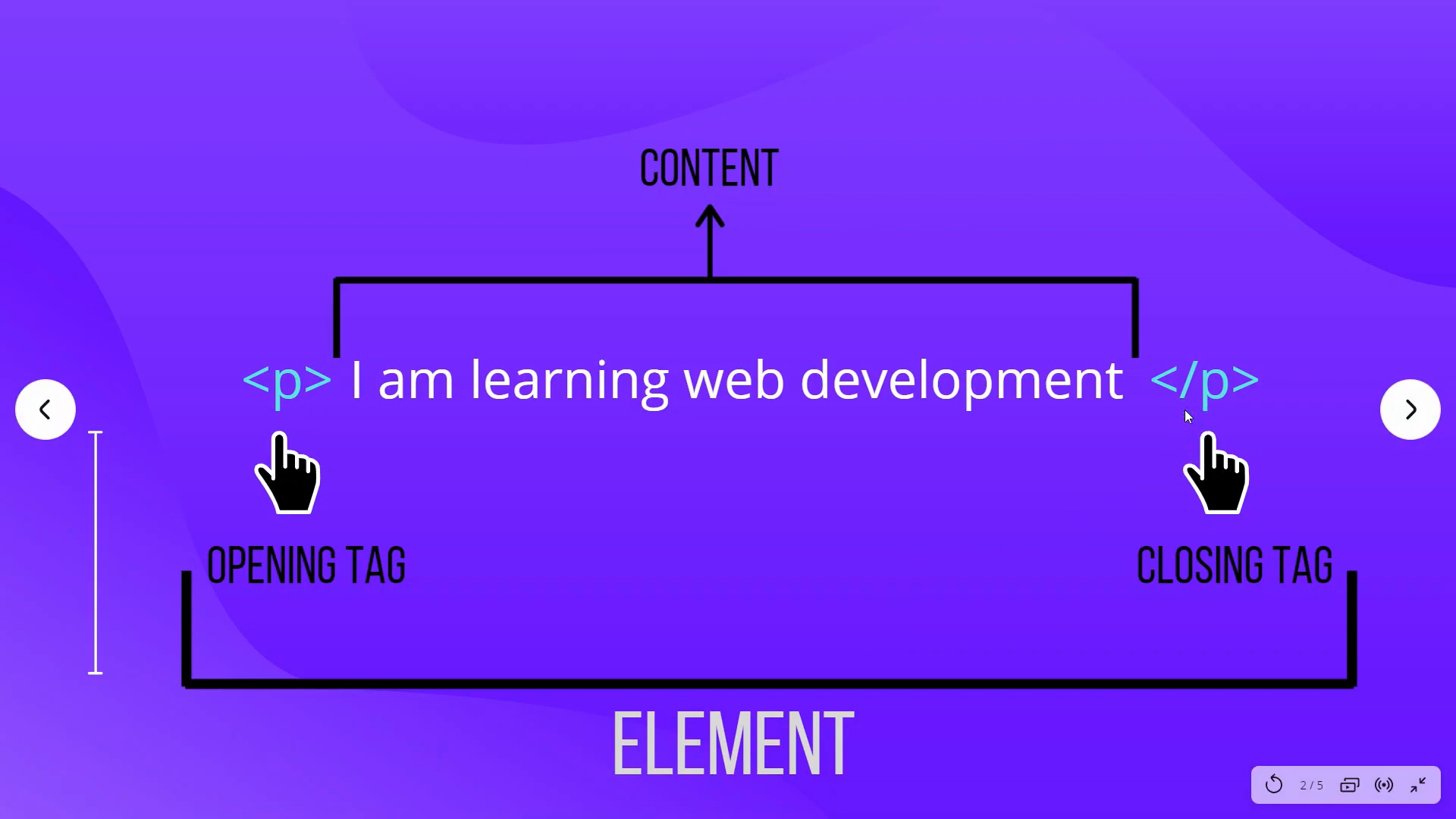
Below is the image which shows the structure of HTML Elements, which consist of an opening tag, a closing tag, and content in between. The difference between an opening and a closing tag is that the forward slash is in the closing tag.
Note - Not all HTML tags need a closing tag. Ex- <br> Tag, which helps in a line break.
HTML Attributes
HTML Attributes just provide additional information about HTML Elements.
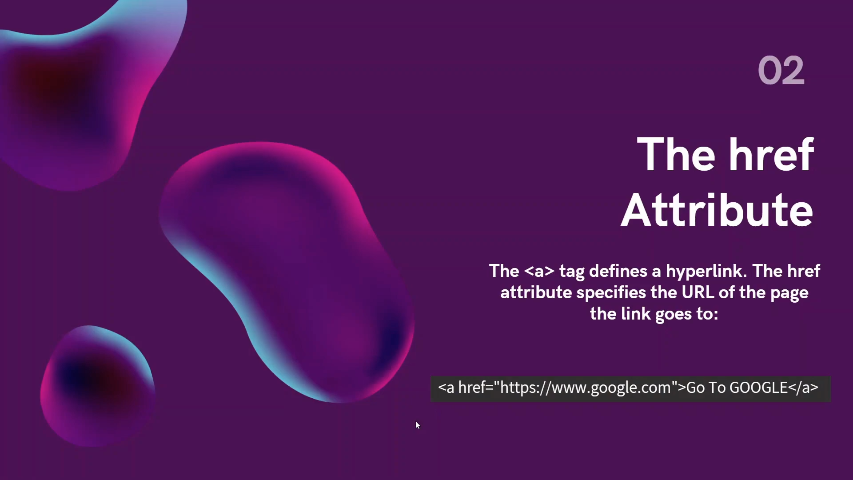
The above self-explanatory image gives a common example of an HTML Attribute.
<img> Tag - Explained
It is important to understand that image is embedded in the web page i.e. technically not inserted but linked into a web page.
The one major attribute of the <img> tag is src, which defines the path of the image.
Other few important attributes of <img> tag are -
- Alt - Specifies the alternate text of the image.
- Height - Specifies the height of the image.
- Width - Specifies the width of the image.
- loading - Specifies when the image should load.
If you would like to learn more about HTML Tags, Elements and Text Formatting, go ahead and watch this video below.


